What is Drip Feed in SMM Panels? Meaning, Examples & How It Works
Social Media Marketing (SMM) panels offer many useful features to help users manage social media growth more effectively, and Drip Feed is one of them. Instead of delivering all followers, likes, or views instantly, the drip feed feature sends them gradually over a selected period of time.
In this guide, we will explain what drip feed means in SMM panels, how it works, its benefits, and why many users prefer it for steady and natural-looking growth.
What is Drip Feed in Simple Terms?
Drip Feed is a feature available in most top Social Media Marketing (SMM) panels that delivers services gradually over time rather than all at once. For example, suppose you placed an order for 2000 followers. Instead of sending all 2000 at once, the drip feed system splits the order into smaller batches and delivers them over time. This avoids any sudden spikes and makes the growth look more natural. This is helpful for large campaigns that require steady growth rather than instant delivery. It gives more control over the order and attracts organic growth. This is one of the most important safety features of any SMM panel.
Why Drip Feed is Used in SMM Panels?
Not every time does a user want instant delivery. Sometimes we need to increase slowly and smoothly, especially for new profiles. A sudden increase in the numbers may not look natural. Sometimes there are campaigns with monthly growth targets. In such a case, you cannot increase instantly. For example, if you need to increase your follower count by 3000 in a month, instead of adding all 3000 on Day 1, you can set a drip feed of 100 followers per day for the whole month. Drip feed is a more balanced, smooth, and organised approach to grow using SMM tools.
This is a beginner's guide to understanding how smm panel drip feed works, its meaning and key terminology, a comparison of drip feed vs. instant delivery, how runs and intervals work, and common mistakes to avoid. In short, we will explain everything you need to know about drip feed so you can use this feature without confusion.
How SMM Panel Drip Feed Works?
Basic Working Concept
The basic function of a drip feed is to divide an order into smaller parts and deliver each part at fixed intervals. Instead of delivering everything at once, the panel system completes the order in multiple runs. You can also do this manually, but it can be very time-consuming to keep coming back to place small orders. But with this feature, you can decide how much quantity to deliver and over what time interval. After you set these criteria, the panel system will follow your instructions and execute orders automatically.
How Orders Are Split Over Time
Whenever you place an order using drip feed, it is broken down into multiple smaller orders, each executed according to the time gap you specify. For example, if you want to order 2000 followers, you can set the runs to 10 and the time interval to 50 minutes. Then it will deliver 200 followers 10 times, with a 50-minute gap between each delivery.
Gradual Delivery vs Instant Delivery Logic
When you place an instant delivery order, the system tries to fulfill it as quickly as possible. This is useful when speed is your priority. On the other hand, drip feed is a gradual delivery method that increases slowly.
Key Components of Drip Feed
What Are Runs in Drip Feed?
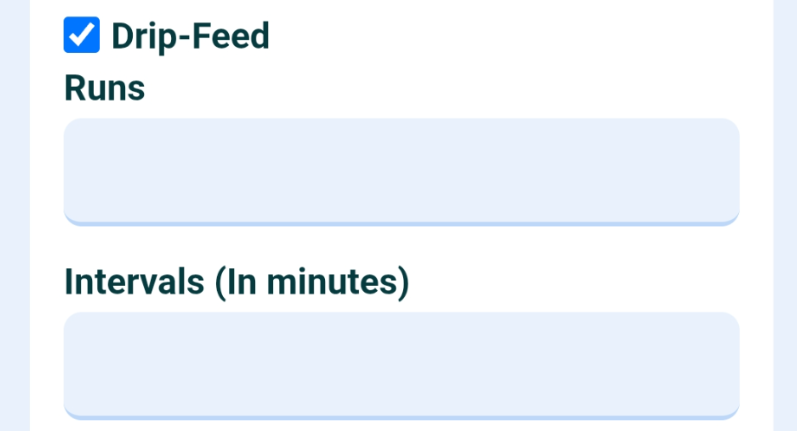
RUNS are the number of times the split order is repeated. For example, if RUN is set to 20, that means the order will be repeated 20 times.
What Interval Time Means
INTERVALS mean the time gap between each RUN. It determines how long the internal system will wait before placing the next split order. It is generally in MINUTES. If you set INTERVALS = 45, each subsequent delivery will occur 45 minutes after the previous one.
How Total Quantity is Divided
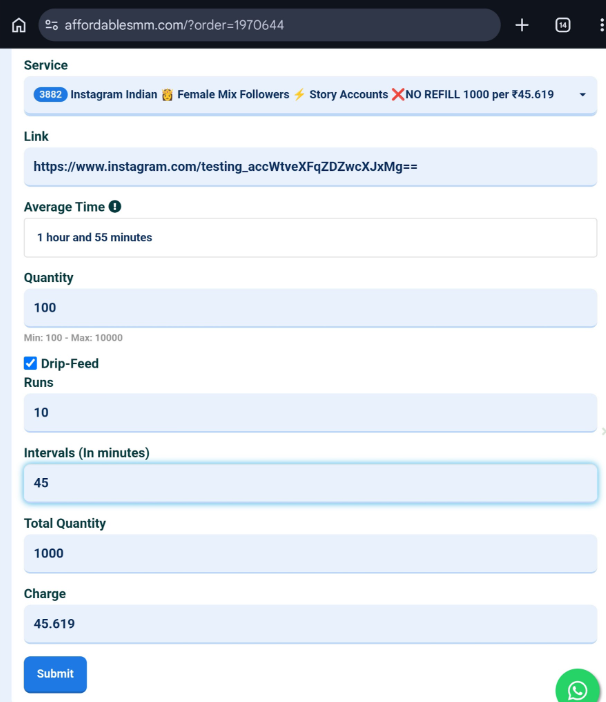
The total quantity is divided as per the number of RUNS specified. Suppose there are 10 RUNS of 100 quantities each, the Total Quantity will be (10x100=1000).
Formula: Total Quantity ÷ Runs = Per Run Delivery
This is a simple formula to calculate how much Quantity will be delivered in each Run. Divide the Total Quantity by Runs to get the Per Run Delivery quantity.
Drip Feed vs Instant Delivery Difference
What is Instant (Simple) Order
Instant order is the default and standard delivery method in SMM panels. You enter the link and quantity, place the order, and the system completes it quickly.
Difference Between Drip Feed and Normal Orders
Normal order focuses on delivering continuously until the whole quantity is delivered, while drip feed delivers in small breaks to give it a natural increase pattern.
Which Method Should You Choose
For small orders, the simple order method is the best. When you need fast delivery, you will always use a simple order format. Only in cases where you want to spread over time should you use a drip-feed system.
Example of Drip Feed Setup
Ordering 1000 Followers with Drip Feed
Now, let us assume that you want to place an order for 1000 followers using a drip-feed setup. You can divide this into various numbers of RUNS. But for now, let us assume you decide on 10 Runs.
Runs: 10
10 Runs means 1000 Followers will be divided into 10 equal parts (Runs), each with 100 Followers.
Interval: 30 Minutes
This means that after the first 100 followers are delivered, the next 100 followers' orders will be executed after a 30-minute interval. If you set this to 60, the gap will be 60 minutes.
Result: 100 Followers Every 30 Minutes
So your full order of 1000 followers will be completed, with 100 followers delivered in each Run, spaced 30 minutes apart.
Real-Life Use Cases (Instagram, YouTube, TikTok)
When you use Instagram SMM services, you can set a drip feed with a daily follower target. While using YouTube, you can do the same for YouTube subscribers to enable gradual delivery. It is the same for Facebook, TikTok, and any other social media platform.
Benefits of Using Drip Feed
Makes Growth Look Natural
The best thing about drip feed is that your numbers increase slowly over time, which makes it look very natural and balanced.
Reduces Sudden Spikes
If you put large quantities into a normal ordering method, it will result in sharp spikes that may impact organic growth.
Better Engagement Pattern
The gradual ordering method creates a smoother engagement pattern, yielding more powerful results by sending positive signals to the algorithm.
Useful for Long-Term Growth Strategy
This method is very good for long-term vision. You can spread your budget and grow your profile in a more structured way to avoid overwhelming it at once, and instead focus on consistency.
When Should You Use Drip Feed
New Accounts or Fresh Posts
It is highly recommended that new profiles avoid bulk quantities delivered at once. In the initial stage, stability matters the most.
Gradual Campaign Growth
If you want your campaign to unfold slowly, use the drip feed method. You can handle big campaigns very smoothly with this method.
Testing Service Quality Safely
Drip feed is also helpful for testing the service behaviour and impact before you choose to order in bulk.
When to Avoid Using Drip Feed
When You Need Instant Results
Whenever there is an urgent delivery requirement, you cannot use a drip feed. Sometimes you need instant engagement to get your content pushed by the algorithm; that time, you should use the instant order method.
Time-Sensitive Campaigns
For short-deadline campaigns, gradual delivery methods may not align with your timeline.
Low Quantity Orders
For very small quantity orders, you don't need a drip feed. Instant orders are a practical choice. Avoid overcomplicating things.
Common Mistakes with Drip Feed
Setting Too Many Runs
If you set too many unnecessary runs, it can create some technical issues as well. A lot of frequent orders on the same link can get stuck in the SMM panels' backend system. Also, it can prolong the process.
Using Very Short Intervals
If you set a very short time interval between the orders, it can again create problems. If the first order is not completed before the second one gets placed, the second order will go into ERROR. In SMM panels, unless an order for a specific service and a specific link is completed, the next one will not start. So if the time interval is very small, then many of the orders will go in ERROR. Always set enough time intervals. You can decide this by checking the service's speed. Always try to keep a gap of at least 2-3 hours.
Exceeding Service Limits
Every service has a maximum base. You can set a maximum quantity per order. If you place a large quantity using a drip feed system that exceeds the maximum base, you will receive fewer deliveries.
Ignoring Service Start Time
Some people don't read the service start time and set the drip feed interval. For example, if a service has a two-hour start time and you set the interval to one hour, the orders will go in ERROR.
Best Practices for Using Drip Feed
Start with Balanced Runs and Intervals
Set Intervals and Runs in a practical way that provides gradual delivery without being overly slow.
Follow Service Limits Carefully
Check the service maximum limitations before finalizing the total quantity of the order.
Combine with Organic Content Strategy
Don't entirely depend on drip feed and SMM services. Use traditional organic marketing methods for your content as well.
Monitor Order Progress Regularly
As we already discussed, some technical issues can occur with drip feed. We advise you to review the order reports regularly.
How to Use Drip Feed in SMM Panel (Quick Steps)
Step 1 – Select Service
Select the service of your choice. Also, check if the drip feed is enabled on that service.
Step 2 – Enter Link
Enter the link where you want the service to be delivered.
Step 3 – Enable Drip Feed Option
Check the drip feed option. When you do this, the drip feed options will expand.
Step 4 – Set Runs and Interval
Enter the RUNS and time INTERVALS for the order.
Step 5 – Place Order and Track
After entering all the details and checking the final cost, hit the submit button to place your order. You can track your order from the order history page.
Frequently Asked Questions (FAQs)
What does drip feed mean in an SMM panel?
Drip feed is the process of slowly delivering orders in SMM panels to maintain a natural growth pattern rather than delivering them all at once.
Is drip feed better than instant delivery?
It depends on the need. Generally, drip feed feels more realistic.
Does drip feed cost more?
There is no difference in the cost whether you place an order using the drip feed or the normal ordering method. Charges are the same.
Can I cancel the drip feed order?
You can cancel any remaining drip feed orders that have not yet been executed. To do that, just go to the drip feed section in the dashboard and click on the Pause button.
Is drip feed safe for accounts?
Drip feed is considered a safer option as it avoids sharp spikes and gives a more natural feel.